mirror of
https://git.huckle.dev/Huckles-Minecraft-Archive/LCE-Revelations.git
synced 2026-05-22 15:15:50 +00:00
 42a582fb9f
Adds the FourKit .NET 10 plugin host as a second dedicated server
build flavour alongside the existing vanilla server. Both flavours
build from the same source tree, with FourKit gated by the
MINECRAFT_SERVER_FOURKIT_BUILD preprocessor define.

Build layout:

  Minecraft.Server         vanilla, no plugin support, no .NET dep
  Minecraft.Server.FourKit FourKit-enabled, ships with bundled
                           .NET 10 self-contained runtime in runtime/
                           and an empty plugins/ folder

Both produce a Minecraft.Server.exe in their own per-target output
dir. The variant identity lives in the directory name, not the
binary name, so either flavour can be shipped as a drop-in.

Native bridge (Minecraft.Server/FourKit*.{cpp,h}):

* FourKitRuntime: hosts CoreCLR via hostfxr's command-line init API
  (the runtime-config API does not support self-contained components)
* FourKitBridge: ~50 Fire* event entry points, with inline no-op
  stubs for the standalone build so gameplay code can call them
  unconditionally
* FourKitNatives: ~80 native callbacks the managed side invokes
  for player/world/inventory mutations
* FourKitMappers: type and enum mapping helpers

Managed plugin host (Minecraft.Server.FourKit/):

* Bukkit-style API: Player, World, Block, Inventory, Command,
  Listener, EventHandler attribute, ~54 event classes
* PluginLoader with per-plugin AssemblyLoadContext
* FourKitHost as the [UnmanagedCallersOnly] entry point table
* Runtime resolves plugins relative to the host process so they
  always live next to Minecraft.Server.exe regardless of where the
  managed assembly itself is loaded from

Engine hooks (Minecraft.Client/, Minecraft.World/):

* Player lifecycle (PreLogin, Login, Join, Quit, Kick, Move,
  Teleport, Portal, Death) wired into PendingConnection and
  PlayerConnection without disturbing the cipher handshake or
  identity-token security flow
* Inventory open/click/drop hooks across every container menu type
* Block place/break/grow/burn/spread/from-to hooks across the
  full tile family
* Bed enter/leave, sign change, entity damage/death, ender pearl
  teleport hooks

Regression fixes preserved while applying donor diffs:

* ServerPlayer::die() retains the LCE-Revelations hardcore branch
  (setGameMode(ADVENTURE) + banPlayerForHardcoreDeath) in both the
  FourKit and non-FourKit code paths
* ServerLevel::entityAdded() retains the sub-entity ID reassignment
  loop required by the client's handleAddMob offset, fixing Ender
  Dragon and Wither boss multi-part hit detection
* LivingEntity::travel() retains the raw Player* cast and the
  cached frictionTile, both Revelations perf wins that the donor
  silently reverted
* ServerLogger.cpp keeps the file-logging code donor stripped
* PlayerList.cpp end portal transition fix and UIScene_EndPoem
  bounds-check are intact

Build system:

* Top-level CMakeLists.txt adds the Minecraft.Server.FourKit
  subdirectory and pulls in the new shared cmake/ServerTarget.cmake
  helper
* Minecraft.Server/cmake/sources/Common.cmake is now location
  independent (uses CMAKE_CURRENT_LIST_DIR) so the source list
  can be consumed from either server target's CMakeLists.txt
* The seven FourKit*.cpp/h files live in their own
  _MINECRAFT_SERVER_COMMON_SERVER_FOURKIT variable so the
  standalone target omits them
* configure-time .NET 10 SDK check fails fast with a clear
  download link if the SDK is missing
* global.json pins the SDK to 10.0.100 with latestFeature
  rollforward

Sample plugin (samples/HelloPlugin/) demonstrates the loader and
the PlayerJoinEvent listener pattern.

CI:

* nightly.yml builds both server flavours, ships
  LCE-Revelations-Server-Win64.zip and
  LCE-Revelations-Server-Win64-FourKit.zip, attests both, and
  updates release notes for the dual-flavour layout
* pull-request.yml pulls in actions/setup-dotnet so the FourKit
  publish step works in PR validation
* All zip artifacts and the client zip are renamed from
  LCREWindows64 to LCE-Revelations-{Client,Server}-Win64

Documentation:

* COMPILE.md gets a VS 2022 quick start, .NET 10 prereq section,
  server flavours explanation, and a troubleshooting section
* docs/FOURKIT_PORT_RECON.md captures the file-by-file recon that
  drove the port
* docs/FOURKIT_PARITY.md is the canonical reference for which
  events FourKit fires

Docker:

* docker-compose.dedicated-server.yml MC_RUNTIME_DIR default points
  at the vanilla CMake output. The FourKit Docker image is
  intentionally NOT shipped yet because hosting .NET 10 self
  contained inside Wine has not been smoke-tested
83 lines
2.6 KiB
Markdown
83 lines
2.6 KiB
Markdown
@page setup Setting up your Development Environment
|
|
|
|
You can use any IDE of choice. I recommend using Visual Studio for new developers.
|
|
|
|
Also make sure you have [.NET 10 SDK](https://dotnet.microsoft.com/en-us/download/dotnet/10.0) installed.
|
|
|
|
@section visual-studio Visual Studio
|
|
|
|
This tutorial will go over creating a plugin in Visual Studio.
|
|
|
|
When installing Visual Studio, make sure you have .NET SDK installed under Individual Components in the Visual Studio Installer.
|
|
|
|
After installing all the prerequisities, go to create a new Project and select Class Library for C#
|
|
|
|

|
|
|
|
After selecting class library and pressing OK, it should prompt what .NET version to use. Be sure to select .NET 10
|
|
|
|
You can name the project whatever you want.
|
|
|
|
After all thats done, you should enter the code environment.
|
|
|
|
First thing you should do is right click your project and add a reference to the compiled FourKit DLL.
|
|
|
|
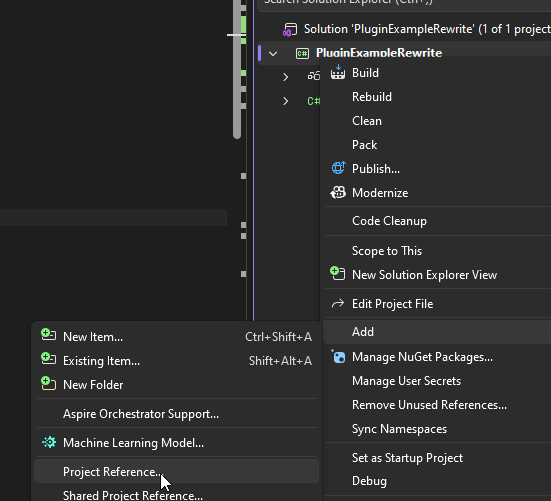
|
|
|
|
Afterwards a popup should appear. Click Browse and then browse to the DLL and then click OK.
|
|
|
|
After that you can continue to making a plugin!
|
|
|
|
@section dotnet Dotnet CLI
|
|
|
|
If you dont want to install Visual Studio, you can use the dotnet CLI program.
|
|
|
|
You can create a new dll project by running `dotnet new classlib -n MyAwesomePlugin`
|
|
|
|
Be sure to add a reference to the FourKit DLL in your csproj file (example for it being in parent dir):
|
|
|
|
```xml
|
|
<ItemGroup>
|
|
<Reference Include="Minecraft.Server.FourKit">
|
|
<HintPath>..\Minecraft.Server.FourKit.dll</HintPath>
|
|
</Reference>
|
|
</ItemGroup>
|
|
```
|
|
|
|
After this, you can build using `dotnet build`! Your compiled DLL should be in the `bin` folder.
|
|
|
|
To build as release: `dotnet build -c Release`
|
|
|
|
Make sure the target framework is set to `net10.0`!
|
|
|
|
Example full csproj file:
|
|
|
|
```xml
|
|
<Project Sdk="Microsoft.NET.Sdk">
|
|
|
|
<PropertyGroup>
|
|
<TargetFramework>net10.0</TargetFramework>
|
|
<ImplicitUsings>enable</ImplicitUsings>
|
|
<Nullable>enable</Nullable>
|
|
</PropertyGroup>
|
|
|
|
<ItemGroup>
|
|
<Reference Include="Minecraft.Server.FourKit">
|
|
<HintPath>..\Minecraft.Server.FourKit.dll</HintPath>
|
|
</Reference>
|
|
</ItemGroup>
|
|
|
|
</Project>
|
|
```
|
|
|
|
@section compiling Building your plugin
|
|
|
|
When you build your plugin, it will compile as a DLL.
|
|
|
|
You place this DLL into the `plugins` folder in your server directory.
|
|
|
|
You can also even have plugins with dependencies!
|
|
|
|
Below page will discuss actually making your plugin function, and using dependencies:
|
|
|
|
@ref plugin-creation |